A 30–60–90 GUIDE · BY MEAMYA CHRISTIE

How Not to Fail at Product Management

Build context. Make useful contributions. Keep learning as you lead.

A practical workbook for entering a product role, understanding the environment, and contributing while the work is already underway.

For your first 90 days, a change in responsibility, or a product you need to understand more deeply.

INSIDE THE WORKBOOK

Learn, align, then lead.

Value starts on day one.
The shape of your contribution evolves.

01 / UNDERSTAND

30days

Build a shared picture.

Understand users, the product, its history, and the people around it. Find gaps and clarify how work moves.

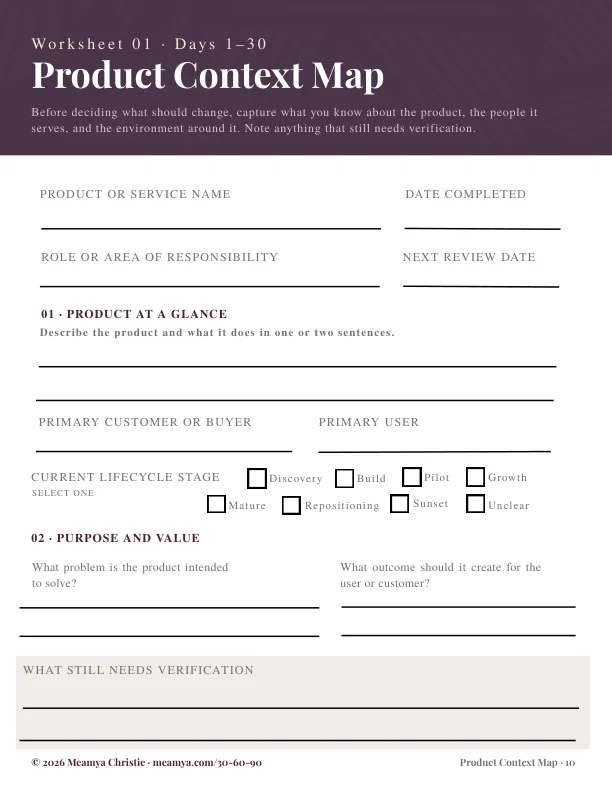
  • Product Context Map
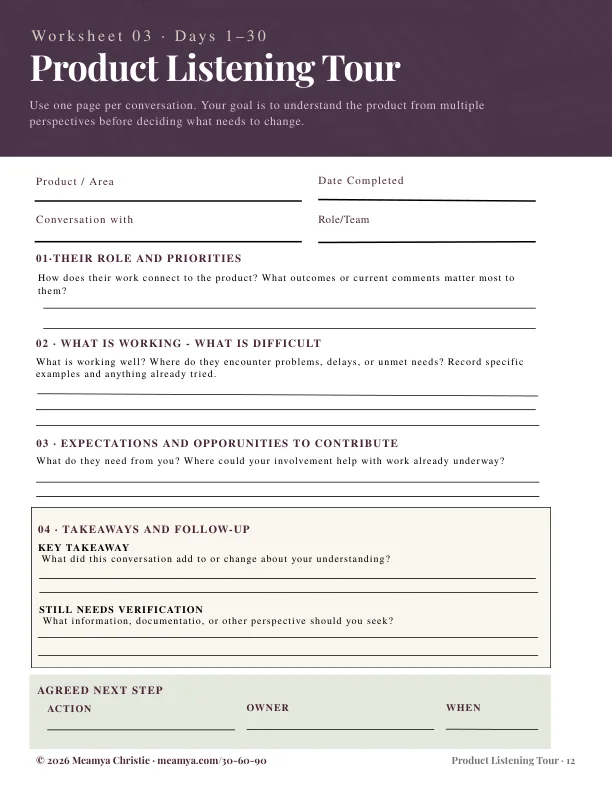
  • Stakeholder Ecosystem & Listening Tour
  • Influence, Alignment & Ownership
YOUR CONTRIBUTION

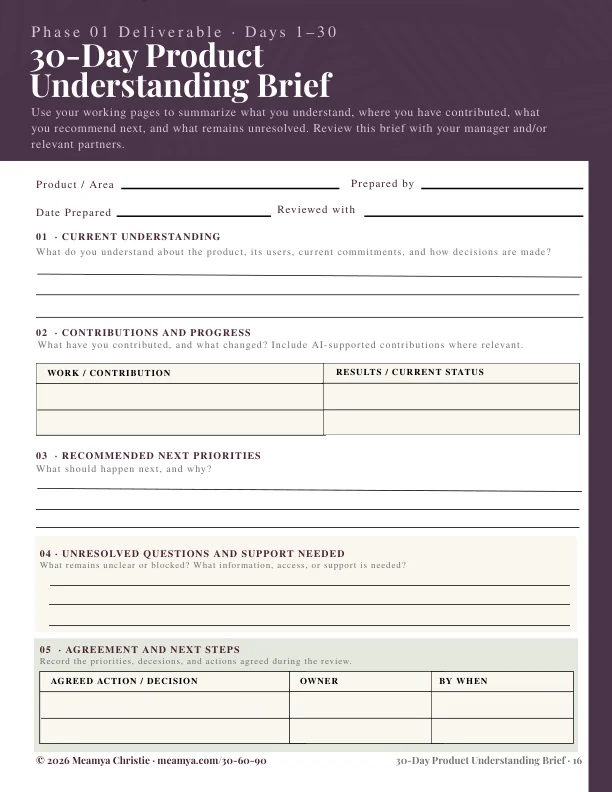
A clear readback, useful questions, and a small improvement.
02 / ALIGN

60days

Turn learning into focus.

Test your understanding with others. Connect opportunities to goals, surface dependencies, and agree on priorities.

  • Problem & Opportunity Assessment
  • Priorities, OKRs & KPI Alignment
  • Delivery & Communication Planning
YOUR CONTRIBUTION

An evidence-backed recommendation and a shared next step.

03 / LEAD

90days

Make direction actionable.

Coordinate execution, review outcomes, and show what has changed. Make support needs and tradeoffs explicit.

  • Progress & Outcomes Review
  • Risks, Questions & Support Needs
  • Next-Period Priorities
YOUR CONTRIBUTION

A direction, a measure of progress, and an accountable plan.

ONGOING / REVISIT THE CYCLE

Product ReLoop Plan

Use the Product ReLoop Plan whenever the product, team, leadership, or strategy changes—or gaps in your understanding become visible.

Revisit the stage that needs attention while continuing the work.

Use these working checkpoints to guide your focus. Adapt them to the product, your authority, and the organization’s pace.

Look inside

Selected pages from the workbook. Open a page for a closer look.

OPTIONAL WEBSITE EXERCISESee how notes become a readback

TRY THE PROCESS

From notes to a working readback.

Choose “Use an example” or enter a few notes. Your words appear under the readback headings as you type. This exercise is separate from the fillable PDF.

PHASE 01 / WEBSITE EXERCISE

Product Context Map

Capture your current understanding, then identify what to validate with people and evidence.

Name the user, their situation, and the need the product serves.

Keep observations, source material, and assumptions distinct.

Include decision makers, collaborators, and people close to users.

Choose one small action within your authority, and a way to check it helped.

0 of 4 prompts filled
0 of 12 prompts across all phases

Use fictional or anonymized details. Entries stay in this tab unless you choose “Save on this device.” They are not sent to AI or added to your PDF. On small screens, the readback appears below the prompts.

HOW TO USE IT

Download. Complete.
Return when you need it.

  1. 01

    Keep a blank master

    After purchase, download the fillable PDF. Keep an untouched original and make a working copy for your product or review period.

  2. 02

    Type, save, and review

    Open your copy in a PDF reader that supports form fields. Complete the relevant pages and save your answers. Use the notes pages for longer entries.

  3. 03

    Return with a purpose

    Use your briefs to discuss findings and next steps. Start a fresh copy when a change calls for a Product ReLoop Plan.

The downloadable PDF saves the answers you enter. The optional website exercise demonstrates a readback; its entries are separate from the PDF.

AI expectations and thoughtful use

PRODUCT WORK, WITH AI

The tools are changing.
Judgment still matters.

AI can speed up a first draft, a synthesis, or a prototype. That changes the pace of product work—and raises the value of knowing what to question, verify, and decide.

Use the framework to clarify your team’s actual AI expectations: approved tools, acceptable data, review responsibilities, and what counts as a useful outcome.

01

From producing artifacts to explaining decisions

Use AI to organize notes or draft options. Bring the evidence, the tradeoff, and the reason a recommendation fits this product.

02

From fast answers to verified understanding

Check generated summaries against source material. Separate what customers said from what a model inferred. Keep uncertainty visible.

03

From doing every task to directing the work

For agent-assisted tasks, define the brief, review the result, and own the outcome. Ask where human review is required.

Try a practical AI prompt

“Using only these approved, anonymized notes, organize the evidence, assumptions, open questions, and possible next steps. Preserve source references. Flag contradictions and missing information. Do not infer decision authority or invent customer findings.”

Context for the changing expectations

Microsoft’s 2025 Work Trend Index describes a shift toward human-agent teams. Atlassian’s product management overview describes the continuing work of gathering insights, setting strategy, prioritizing, and aligning teams. The practical applications above are this preview’s editorial interpretation.

Microsoft Work Trend Index, 2025 ↗Atlassian: Product management ↗

A FEW PRACTICAL QUESTIONS

Before you begin.

What can I try for free?

View selected pages from the workbook, then optionally try a short website exercise to see how notes become a working readback. The complete fillable PDF is a separate purchase.

Is this a complete product management course?

It is a focused starter guide for entering a role, understanding the environment, and making useful contributions. It gives you a working process rather than trying to cover every part of the profession.

Do I have to wait 30 days to deliver value?

No. An accurate readback, a clarified decision, a resolved documentation gap, or a small improvement can help immediately. The phases guide your focus as the scope of your contribution grows.

Can I use it if I am already a product manager?

Yes. Use the Product ReLoop Plan when you inherit a product, join a new team, or need to rebuild shared understanding after a change.

What is the readback demonstration?

Try one abbreviated worksheet for each phase, see your working readback, and export your notes. The sample is open to explore without a purchase or email signup.

What happens to my worksheet entries?

They are held in this tab. Choosing “Save on this device” stores them in this browser, and “Remove saved copy” deletes that stored copy. “Download my notes” exports a text file to your device. Entries are not sent to a server or an AI service.

How does the fillable workbook work?

The complete workbook is a fillable PDF. Download it, make a working copy, and type into its fields using a compatible PDF reader. Save your copy to retain your answers. You can also print pages for handwriting. Website sample entries are separate from the PDF.

What if the organization makes this work difficult?

The process can help you clarify expectations, document gaps, and make specific requests. It cannot guarantee cooperation where information is withheld, authority is blocked, or confusion is deliberate. Responsibility for a workable environment does not belong to the product manager alone.